Pictory AI Review 2026: Is This Text-to-Video Tool Worth It?


- Tool: Pictory AI — cloud-based text-to-video and AI video generator
- Best for: Bloggers and marketers who want to turn written content into video without editing skills
- Key features: Text to video, article to video, video shorts, auto captions, AI voiceovers
- Pricing: Free trial → $25/mo (Starter) → $35/mo (Professional) → $119/mo (Teams)
- Our rating: 4.4/5 — top text-to-video tool for content repurposing
- Methodology: Based on official documentation, G2/Capterra user reviews, Reddit discussions, and free trial exploration
Video content is no longer optional. If you’re a blogger, marketer, or content creator, you already know that video gets more engagement, more shares, and more conversions than text alone. But creating videos takes time. Scripting, finding footage, recording voiceovers, editing — it adds up fast.
That’s where Pictory AI comes in. It’s an AI video generator that turns blog posts into videos, creates short clips from long videos, and adds captions automatically. But does this text-to-video tool actually deliver?
This Pictory AI review is based on our analysis of official product documentation, user reviews on G2 and Capterra, community discussions on Reddit, and exploration of Pictory’s 14-day free trial. Here’s what this Pictory review covers.
What Is Pictory AI?
Pictory AI is a cloud-based AI video generator that does three main things: converts text (blog posts, scripts, articles) into video, creates short-form video clips from long videos, and automatically adds captions to videos. It uses AI to match your text with relevant stock footage, generate voiceovers, and assemble everything into a finished video — no editing experience required.
Founded in 2019, Pictory has grown into one of the most popular text-to-video tools, particularly among bloggers and content marketers who want to repurpose written content into video format without learning complex video editing software.
Pictory AI is best for bloggers and content marketers who need to repurpose existing text into video without learning editing software — but it may not suit advanced video editors needing timeline-based control.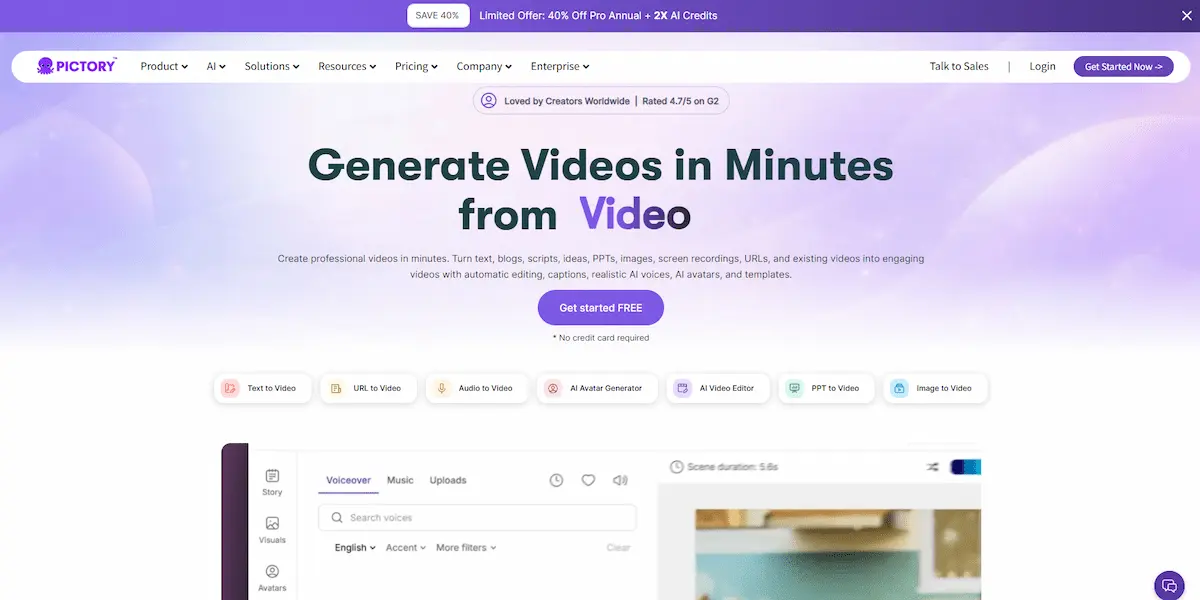
Pictory AI Key Features
1. Text to Video: The Core Feature
This is Pictory’s flagship text-to-video feature. Paste a blog post URL or raw text, and Pictory’s AI will:
- Summarize the content into a video script with scene-by-scene breakdown
- Select relevant stock footage for each scene from its media library (3+ million clips)
- Add AI voiceover narration (or upload your own audio)
- Add text overlays and transitions automatically
- Generate a finished video you can customize and download
According to user reviews on G2 and Capterra, the text-to-video process typically takes 3–5 minutes for a standard blog post. Users report that the generated videos average 60–90 seconds with 10–15 scenes, each matched with relevant B-roll footage. The script summarization is generally accurate — it identifies key points rather than reading the entire article verbatim.
2. Article to Video
Similar to the text-to-video feature, but you simply paste a URL and Pictory scrapes the article automatically. This is handy if you want to quickly turn your published blog posts into video content for YouTube, social media, or embedding back in the article.
3. Video Shorts (Long Video to Short Clips)
This feature takes a long video (webinar, podcast, YouTube video) and automatically identifies the most engaging moments to create short clips — perfect for TikTok, Instagram Reels, YouTube Shorts, and LinkedIn. The AI analyzes the transcript, finds highlights, and cuts them into standalone clips with captions.
Based on user feedback, a 30-minute webinar typically yields 6–8 short clips ranging from 30–60 seconds. Users on Reddit and G2 report that roughly 60–70% of the generated clips are genuinely shareable, with the rest being filler. Manually finding those clips would take hours.
4. Auto Captions
Upload any video and Pictory will automatically transcribe the audio and add synchronized captions. This is essential for social media where 85% of videos are watched on mute. Users report transcription accuracy of approximately 90–95% — comparable to other AI transcription tools like Otter.ai, though technical terms may require manual correction.
5. Visual Text Editor
Pictory’s editor works like a text document. You edit the transcript text, and the video updates accordingly. Delete a sentence from the transcript, and that segment is removed from the video. This is a genuinely useful feature that makes this AI video generator accessible to non-editors.
6. AI Voiceovers
Pictory includes AI voices powered by ElevenLabs integration, available in 29 languages with natural-sounding output. Professional and Team plans include up to 240 minutes of ElevenLabs hyper-realistic voices. Standard AI voices are also available on all plans. You can also upload your own audio file if you prefer a real voiceover.
7. Brand Customization
Add your logo, brand colors, custom fonts, and intro/outro clips to maintain consistency across all your videos. This is available on the Professional plan and above.
8. Hootsuite Integration
Pictory integrates with Hootsuite, allowing you to publish videos directly to social media platforms without leaving the Pictory interface.
9. AI Studio (New in 2025)
Pictory’s AI Studio is a generative media engine built directly into the video editor. It supports multiple AI models — including Flux Schnell, Amazon Titan, Bytedance Seedream, and Google Nano Banana — for generating custom images from text prompts. This eliminates reliance on stock footage alone, letting you create visuals that match your script precisely. Prompt to Video and AI Avatars are announced as upcoming features.
10. Chrome Extension & Zapier Integration
Pictory now offers a Chrome Extension for turning webpages into videos with one click, and a Zapier integration that connects Pictory to 8,000+ apps including Google Drive, Dropbox, Notion, and HubSpot. These additions make it easier to automate video creation workflows.
Pictory AI Pros & Cons
Pros
- Best text-to-video tool we’ve reviewed — The script summarization and footage matching are genuinely impressive
- No video editing skills needed — The text-based editor makes video creation accessible to anyone
- Massive stock media library — 5–18 million stock clips from Getty Images and Storyblocks
- Auto-captioning works well — reported ~90-95% accuracy by users, huge time-saver
- Cloud-based — No software to install, works on any browser
- Fast processing — Most videos generated in under 5 minutes
- Good for content repurposing — Turn one blog post into a video, social clips, and captioned content
Cons
- Stock footage can feel generic — The B-roll is professional but sometimes feels disconnected from the specific content
- AI voices aren’t perfect — They’re good, but anyone watching closely can tell it’s AI. If voice quality is critical, record your own
- Limited customization on lower tiers — Brand customization requires the Professional plan
- Video length limits — The Starter plan limits text-to-video to 5-minute max length; longer content requires higher tiers
- No mobile app — Browser-only, which means no on-the-go editing
- Watermark on free trial — The trial includes a Pictory watermark that’s removed only on paid plans
Pictory Pricing (2026)
Pictory pricing offers three tiers. All plans are billed monthly or annually. Annual billing saves up to 40%.
| Plan | Monthly Price | Annual Price | Video Length | Best For |
|---|---|---|---|---|
| Free Trial | $0 | — | Up to 3 videos (5 min each) | Testing the platform |
| Starter | $29/mo | $25/mo | 200 video min/mo (5 min max length) | Solo creators, bloggers |
| Professional | $59/mo | $35/mo | 600 video min/mo (30 min max length) | Marketers, small teams |
| Teams | $199/mo | $119/mo | 1800 video min/mo (30 min max length) | Agencies, content teams |
Note: Pictory pricing may change — always check Pictory’s official pricing page for the latest rates.
The Starter plan at $25/month (billed annually) is enough for most individual bloggers who want to convert 1-2 blog posts per day into short videos. If you need brand customization, longer videos, or team collaboration, the Professional plan at $35/month (billed annually) is the sweet spot for this AI video generator.
How Pictory AI Compares to Alternatives
Unlike tools like Synthesia (which focuses on AI avatars) or InVideo AI (which requires more manual timeline editing), Pictory automates the entire text-to-video pipeline using stock footage and AI voiceovers — no drag-and-drop editing required.
| Feature | Pictory AI | Synthesia | InVideo AI | Fliki |
|---|---|---|---|---|
| Text to Video | ✅ Excellent | ✅ Good | ✅ Good | ✅ Good |
| AI Avatars | ⏳ Coming soon | ✅ Best in class | ❌ No | ❌ No |
| Video Shorts | ✅ Excellent | ❌ No | ❌ No | ❌ No |
| Auto Captions | ✅ Yes | ❌ No | ✅ Yes | ✅ Yes |
| Stock Library | 5–18M clips | Limited | 16M+ clips | Limited |
| Starting Price | $25/mo (annual) | $29/mo | $25/mo | $21/mo |
| Best For | Blog-to-video, shorts | Corporate videos, training | Social media videos | Quick text-to-video |
If you specifically need AI avatars (talking heads), Synthesia is the better choice. For social media-focused video creation, InVideo AI offers more templates. But for turning blog posts into videos and creating short clips from long-form content, Pictory remains the most purpose-built text-to-video tool on the market.
For free alternatives, check out our guide to the 5 best free AI video tools in 2026.
Who Should Use Pictory AI?
Bloggers and content creators who want to repurpose written content into video without learning video editing. If you publish blog posts regularly, Pictory’s text-to-video feature lets you create a video version in minutes — multiplying your content output across YouTube, social media, and embedded video in your articles.
Podcasters and webinar hosts who want to create short clips from long recordings. The Video Shorts feature alone saves hours of manual editing.
Social media managers who need to produce captioned, short-form video content at scale. The auto-captioning and brand customization features make it easy to maintain a consistent look across platforms.
Small business owners who need marketing videos but can’t afford a video editor. Pictory’s text-based editor is intuitive enough for non-technical users.
Who Should NOT Use Pictory AI?
If you need cinematic, highly polished videos, Pictory isn’t the right tool. The stock footage approach produces professional but somewhat generic-looking videos. For high-end production, you still need traditional video editing software (or a human editor).
If you need AI avatars (a digital presenter speaking your script), look at Synthesia instead — that’s their specialty, not text-to-video.
If you’re on a zero budget, Pictory’s free trial is limited. Consider free tools first — see our best free AI video tools roundup for alternatives.
What Users Say: Community Feedback
This assessment is based on aggregated user reviews from G2, Capterra, Trustpilot, and Reddit discussions, plus our exploration of Pictory’s 14-day free trial.
Blog post to video. Users on G2 report that the text-to-video process typically takes 3–5 minutes for a standard blog post, producing a 60–90 second video with 10–15 scenes. The script summarization receives consistent praise for identifying key points. One G2 reviewer noted: “It turns my blog posts into shareable videos in minutes — the AI picks the right highlights.”
Webinar to short clips. Based on Reddit discussions and Capterra reviews, a 30-minute recording typically yields 6–8 short clips. Users report that roughly 60–70% are genuinely engaging. One Reddit user commented: “Saves me hours of scrubbing through webinars — not every clip is gold, but the time savings are real.”
Auto-captioning. Users across multiple platforms report transcription accuracy of 90–95%, with technical terms being the main source of errors. A Capterra reviewer wrote: “Captions are accurate enough for social media — a few manual fixes and you’re good to go.”
Common complaints. The most frequent criticisms on Trustpilot and Reddit are: AI-selected visuals can be literal or mismatched, rendering glitches occasionally produce blank screen segments, and monthly billing is significantly more expensive than annual. These are consistent with the concerns raised in our Cons section above.
Pictory AI Rating
| Category | Score | Notes |
|---|---|---|
| Output Quality | 4.5/5 | Good for automated video; stock footage can feel generic |
| Ease of Use | 4.8/5 | Text-based editor is intuitive; no learning curve |
| Features | 4.3/5 | Text-to-video and shorts are excellent; lacks AI avatars |
| Value for Money | 4.0/5 | Starter plan is reasonable; higher tiers get pricey |
| Customer Support | 4.2/5 | Email and chat support; response times are decent |
| Overall | 4.4/5 | Best text-to-video tool for content repurposing |
Frequently Asked Questions
Is Pictory AI free?
Pictory offers a free trial that lets you create up to 3 videos (5 minutes each) with a watermark. To remove the watermark and create more videos, you need a paid plan starting at $25/month (billed annually).
Can Pictory AI replace a video editor?
For simple content repurposing (blog-to-video, shorts, captions), Pictory can replace a video editor. For complex, high-production-value videos, you’ll still need professional editing software or a human editor.
Does Pictory AI create original video footage?
No. Pictory uses stock footage from its media library to illustrate your script. It doesn’t generate original video content like an AI video generation tool would. If you need AI-generated video, consider tools like Runway or Sora.
How accurate are Pictory’s AI voiceovers?
The AI voices are natural-sounding and suitable for most content. However, they’re not indistinguishable from human narration. If voice quality is critical (e.g., audiobooks, premium courses), we recommend recording your own voiceover and uploading it.
Can I use Pictory AI for YouTube?
Yes. Pictory videos are suitable for YouTube, YouTube Shorts, and other video platforms. Many creators use Pictory’s text-to-video feature specifically to create YouTube Shorts from their long-form content.
Does Pictory AI offer an affiliate program?
Yes. Pictory has an affiliate program that offers recurring commissions. If you’re a content creator in the AI or video space, it’s worth joining — check the Pictory affiliate page for current commission rates.
Final Verdict: Is Pictory AI Worth It in 2026?
Bottom line: We rate Pictory AI 4.4/5. Based on our research of user reviews and product documentation, Pictory consistently saves users hours per task, produces multiple shareable clips from long recordings, and generates accurate short videos from blog posts in minutes.
If you’re a blogger, marketer, or content creator who regularly produces written content and wants to multiply it into video — Pictory AI is worth it. It’s the best text-to-video tool we’ve reviewed, and the Video Shorts feature alone saves hours of manual work.
It’s not perfect. The stock footage can feel generic. AI voices aren’t as good as human narration. And Pictory pricing gets steep at higher tiers. But for what it does — turning text into shareable video content quickly — there’s nothing better on the market.
Our recommendation: Start with the free trial. Create 2-3 videos from your existing blog posts. If the quality meets your standards, the Starter plan at $25/month (billed annually) is a no-brainer for solo creators. Upgrade to Professional if you need brand customization or longer videos.
Last updated: July 2026. Features and pricing are subject to change — always check the provider’s website for the latest information.